
Login Page
Overview
Portals can be one of the following types:
- No Registration (Open)
- Secure
- Personalized
Knowledgebase administrators can restrict unauthorized users from accessing the portals by requiring them to login. The No Registration portal type does not require users to submit login credentials (username and password), the other portal types - secure and personalized can be configured such that users have to submit their login credentials in order to access the portal.
The default settings for portal login can be changed as follows:
- Users can be empowered to reset their password.
- Portal administrators can change the UI elements in the default portal login screen as illustrated in
Figure - "Portal Login Screen".
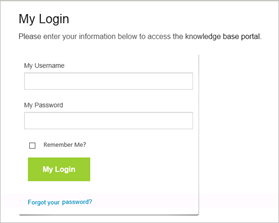
Figure : Secure and Personalized Portal Login Screen
These changes can be made by editing the Portal Configuration file and the Language file respectively.
Configure Password Reset
- Login to Portal Administration.
- Click Edit in a portal's row in the Available Portals list.
- Click Configuration.
- Scroll to the line:
<Login> - Make changes to the tag as described in the table "Enable Password Reset"
- Click Save.
|
XML Section |
Description |
Example |
|
<login> |
Set to "true" to enable the user to reset their password. |
<resetPassword enabled="true" /> |
Table : Enable Password Reset
Change Login Settings
- Login to Portal Administration.
- Click Edit in a portal's row in the Available Portals list.
- Click Language.
- Scroll to the line:
<Login>
and step into each line till
</login> - Make changes to the tags as described in table "Login Settings".
- Click Save.
|
XML Section |
Edit text between > < to change the settings in the Login Screen |
|
<login> |
Do not change. |
|
<title>My Login</title> |
>My Login< can be changed to > Mon ID de connexion < if the administrator wishes to display this screen in French. |
|
<instructions>Please enter your information below to access the knowledge base portal.</instructions> |
> S'il vous plait entrer vos informations ci-dessous pour acceder au portail de la base de connaissances.< |
|
</login> |
Do not change. |
Table : Login Settings
The changes will be effective when users next log-into the portal.
Note: Editing the Language file to change the login settings is highly recommended for setting up Knowledge Spaces™ in a language other than English.